Introduction
Restaurant management software is a collective term for software used to support restaurant operations. This is primarily POS software, but other kinds of software can also be included.
Advantages
Typically, RMS is useful in ordering, billing, inventory management, and queue management.
The advantages of using software to manage restaurant operations include not only increasing efficiency and decrease customer response time, but also preventing employee cheating.
Overall Description
Functionalities:
Following functionalities are provided by the RMS:
- Login – Each waiter/waitress has a username and password. With which they can login and take the order.
- Table management – According to the availability of table the customer is allotted the table. If a particular table is available it is shown with green and occupied table number turns red.
- Ordering of food – A menu is available for the waiter/waitress. He/she has to just the select the table and the food item ordered by the customer and enter the quantity of food item asked for and as to press update button to update the order every time anything else is ordered. i.e. the order is updated.
- Separate data for each table – The data for the order of each table is separate. Every time the particular table is selected its order is displayed and it can be appended.
- Generation of Bill – After the order is finished this button is pressed and a bill is printed, and the table is made available for a other customers and its data is cleared to zero.
- Calculation of tax with added option of dine-in, take out or delivery – This functionality helps the generation of bill easy. It calculates the total bill with all the taxes. It also includes cost according to the option of dine-in, take-out and delivery.
Working
General flow of the RMS program:
- Launch of Software: The software is launched in order to proceed.
- Login Screen: To avail the service, the correct username and password are entered.
- Selection of table: Out of the available table is selected. Available table is indicated with green color while occupied table is indicated with red color.
- Add food items: Whatever the customer orders out of the given menu is entered using the space given beside the respective food item. Quantity is updated.
- Bill generation: At the end when the customer finishes, bill is generated with the taxes and the other added charges.
Preliminary Design
ER diagram

GUI windows
- Login Screen
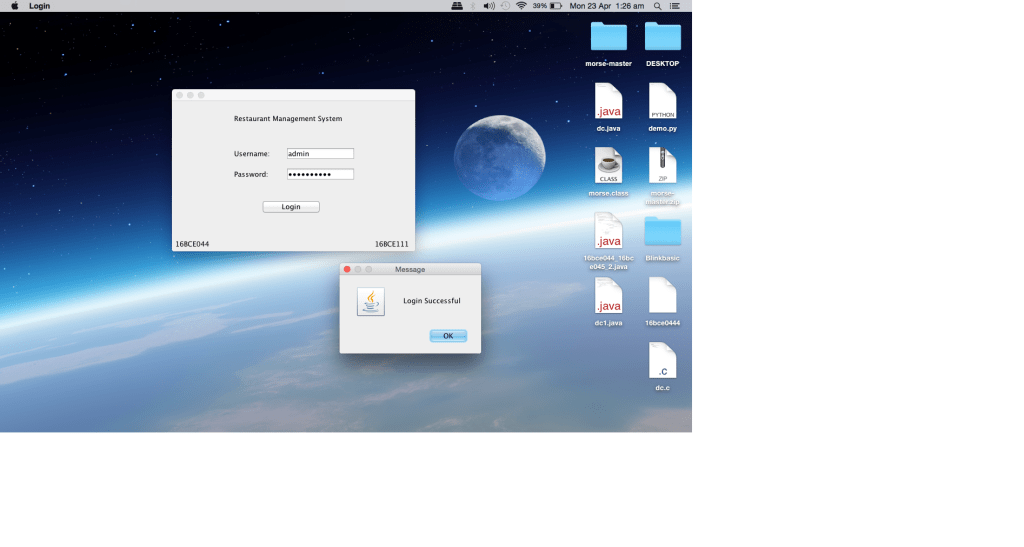
Initially when the program is started, a login screen appears. On entering the valid user name and password; a popup will notify that user has successfully logged in and the main interface of Restaurant Management System is opened.
- Main Interface

After successful log in, user will have access to the main interface and the following features:
- Table No: To select the table for which the order is being placed.
- Occupancy: Displays the occupancy of the tables, green indicates free while red indicates that the table is occupied.
- Dine In/Take Away: This radio button allows the user to select whether the customer is dining in or taking away the order.
- Menu: There are main categories namely – food items, drinks and desserts. Text field is used to input the quantities. The price and quantity are displayed next to the text field.
- Total: Cost, taxes and final total are calculated and displayed at the bottom left on clicking the generate bill button.
- Update: This button is used to update the order value.
- Generate Bill: This button is used to generate the bill.
- Pay and Exit: This button frees the table and resets the order to default. To be clicked at the end of payment.
- Summary
This project is for making the process inside a restaurant very easy. The queue is managed and wait time of customer is organized. Table is managed and order is taken from a particular table. Updating order is also a very easy task. Generation of bill takes place with all the details needed. It is user friendly program.
- Conclusion
From this project we learnt the usage of Swing in JAVA. Designing an interface is also learnt. We also got the knowledge of event handling and its implementation. We also learnt using various components like Jframe, combobox, lable and textfield. We also implemented the knowledge gained in the class and put it in the practice.
References
 Nirav's blog